Deploying LAMP Server (TBC)
Overview
This lab builds a LAMP server deployment workflow and captures the setup steps for later automation.
Diagram:
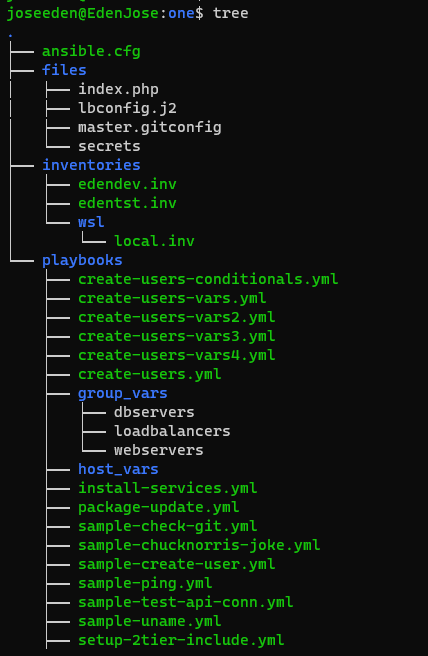
The tree-structure of our Project One currently looks like this. Don't worry if you see that there's already a lot of files in the directory. These are the files from the previous labs in this series. The only ones we'll really really need are also provided below.
Project One
ansible.cfg
 [defaults]
# E: variables for my personal lab
inventory = ~/proj-ansible-1/one/inventories/edendev.inv
remote_user = eden
private_key_file = ~/.ssh/id_rsa
host_key_checking = False
retry_files_enabled = False
timeout = 24
gather_facts = smart

#ansible_managed = "# This file is managed by Ansible, all local changes will be lost !"
#allow_world_readable_tmpfiles = True
#precedence = all_plugins_play, all_inventory, groups_plugins_play, groups_inventory, all_plugins_inventory, groups_plugins_inventory
#any_errors_fatal = True
#timeout = 24

[privilege_escalation]
#become_method = sudo
#become=True
#become_user=root
#become_ask_pass=False

[paramiko_connection]
#record_host_keys = False

[ssh_connection]
scp_if_ssh = True
pipelining = True
symlink in root directory pointing to projects folder
$ ls -la | grep "\->"
lrwxrwxrwx  1 joseeden joseeden    70 Jan 14 23:03 proj-ansible-1 -> /mnt/c/Users/Eden Jose/4-Projects
For this lab, we'll assume that it's a monolothic application thus we will only deploy both the web application and database server on a single node. We might create one for a multi-node setup (which is what we have right now) on the next lab.
Recall that we used a default edendev.inv inventory file for the previous labs. We also created another edentst.inv in some of our other previous labs.
For this one, we'll be using a different inventory file and instead of changing the ansible.cfg, we'll just specify this new inventory file when we run the playbook.
edensinglenode.inv
# edensinglenode.inv

[db_web]
app1    ansible_host=13.251.146.254

[local]
localhost   ansible_connection=local
Before we proceed, it's important to lay down the steps that we'll be automating.
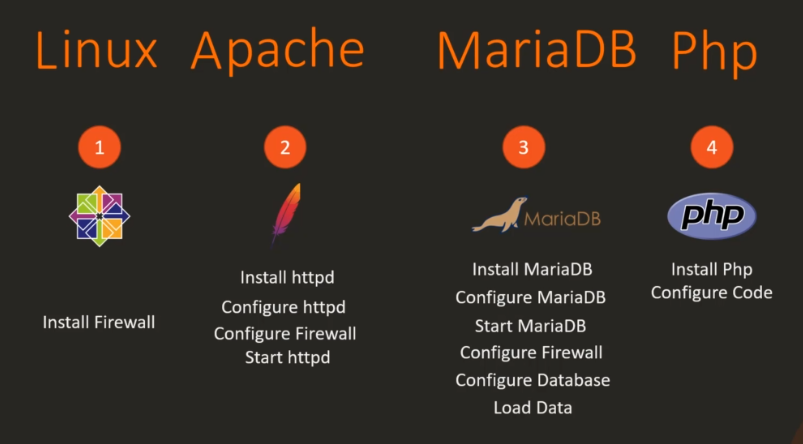
Breakdown of Steps
Install Firewall
sudo yum install -y firewalld
sudo service firewalld start
sudo systemctl enable firewalld
Install MariaDB
sudo yum install -y mariadb-server
sudo vi /etc/my.cnf
sudo service mariadb start
sudo systemctl enable mariadb
Configure firewall for Database
sudo firewall-cmd --permanent --zone=public --add-port=3306/tcp
sudo firewall-cmd --reload
Configure Database
On a multi-node setup remember to provide the IP address of the web server here: 'ecomuser'@'web-server-ip'
$ mysql
MariaDB > CREATE DATABASE ecomdb;
MariaDB > CREATE USER 'ecomuser'@'localhost' IDENTIFIED BY 'ecompassword';
MariaDB > GRANT ALL PRIVILEGES ON *.* TO 'ecomuser'@'localhost';
MariaDB > FLUSH PRIVILEGES;
Load Product Inventory Information to database
cat > db-load-script.sql <<-EOF
USE ecomdb;
CREATE TABLE products (id mediumint(8) unsigned NOT NULL auto_increment,Name varchar(255) default NULL,Price varchar(255) default NULL, ImageUrl varchar(255) default NULL,PRIMARY KEY (id)) AUTO_INCREMENT=1;

INSERT INTO products (Name,Price,ImageUrl) VALUES ("Laptop","100","c-1.png"),("Drone","200","c-2.png"),("VR","300","c-3.png"),("Tablet","50","c-5.png"),("Watch","90","c-6.png"),("Phone Covers","20","c-7.png"),("Phone","80","c-8.png"),("Laptop","150","c-4.png");

EOF
Load Data.
mysql < db-load-script.sql
Install packages for Web server
sudo yum install -y httpd php php-mysql
sudo firewall-cmd --permanent --zone=public --add-port=80/tcp
sudo firewall-cmd --reload
Configure httpd
# Change DirectoryIndex index.html to DirectoryIndex index.php to make the php page the default page
sudo sed -i 's/index.html/index.php/g' /etc/httpd/conf/httpd.conf
Start httpd
sudo service httpd start
sudo systemctl enable httpd
Download code from Git
sudo yum install -y git
git clone <repository-url> /var/www/html/
Update index.php
On a multi-node setup remember to provide the IP address of the database server here.
# Update index.php file to connect to the right database server. In this case localhost since the database is on the same server.
sudo sed -i 's/172.20.1.101/localhost/g' /var/www/html/index.php

              <?php
                        $link = mysqli_connect('172.20.1.101', 'ecomuser', 'ecompassword', 'ecomdb');
                        if ($link) {
                        $res = mysqli_query($link, "select * from products;");
                        while ($row = mysqli_fetch_assoc($res)) { ?>
sudo sed -i 's/172.20.1.101/localhost/g' /var/www/html/index.php
Finally, test it.
curl http://localhost
To be continued...